
Meta Data Sharing Restrictions Explained
12 min read
What a Meta data sharing restriction is
A data sharing restriction is a limit Meta puts on your website, not on your ad account and not on a specific ad. Meta looks at the data your pixel sends — the hostname, the page path, the URL parameters — decides which category your site belongs to, and if that category is a sensitive one, it stops accepting some or all of the events from that domain. Nothing gets disabled. Your Facebook pixel keeps firing on every page. The events just never show up in Events Manager, so any campaign optimizing for them has nothing to learn from.
That is what makes it so easy to miss. Say you run Meta ads for a dental clinic. On Friday everything is normal. On Monday you look at the weekend and there is not a single Lead. Nobody changed anything. Google Analytics still shows the form fills, so the forms clearly work. Meta simply does not see them anymore.
How Meta decides your site is in a restricted category
Meta reads the URLs your pixel reports and infers what the site is about. It looks at the hostname, the page path and the URL parameters, then assigns the domain to a category. Sites in sensitive categories get data sharing restrictions, so that Meta stays on the right side of its own Business Tools Terms.
Those terms say you may not send Meta health information. But if your Facebook pixel fires on bestever.dentist/sedation-tooth-extraction, that is exactly what happens. Anyone on that page is very likely someone who needs that treatment, and now Meta knows it. You did not do anything wrong on purpose. You put a pixel on your website, the way everyone does. The pixel reported the page it was on, the way it always does, and that was enough.
Two things are worth being clear about, because guessing here wastes a lot of time.
The decision is automatic, and there is no useful pattern. After auditing more than 36,000 sites we still cannot predict which one Meta will restrict. Two clinics offering the same treatments, with similar URLs, sometimes even under the same Business Manager: one gets restricted, the other does not. It looks close to random from the outside.
The restriction follows the domain, not the pixel. This is the single most important fact on this page, and it rules out most of the fixes people try first. See why the Conversions API alone won't fix a blocked domain for what that means in practice.
Which industries Meta restricts
Health and medical is the biggest category by far, and dental and aesthetic clinics get hit especially hard. Beyond that, Meta restricts gambling, adult, firearms, tobacco, alcohol, supplements and wellness, pharma, mental health, faith and religion, and parts of finance, lending and crypto. Customer portals and sites behind a registration wall are often flagged too.
Healthcare is where it hurts most, simply because of the size of the market. A huge number of advertisers are in it, and most of them have no idea this is a thing until their conversions stop.
Third-party booking systems sometimes escape it
If your booking flow lives on someone else's domain rather than yours, you may avoid the restriction entirely. It depends on what that domain's URLs look like.
Take a booking platform whose URLs look like besteverdoctor.example-booking.com/doctors?specializationId=86435. There is nothing sensitive in that URL. No treatment name, no condition, no specialty in plain text. Meta has no obvious reason to classify the domain as healthcare, so the platform's domain stays clean and every clinic booking through it keeps its conversion tracking.
The flip side matters just as much: if you embed that same booking widget in an iframe on your own restricted domain, you get nothing. The pixel fires on your page, reports your URL, and the restriction applies. What saves the platform is that the conversion happens on a different, unclassified domain — not the booking software itself.
How common this is
Restrictions are not a rare edge case. In August 2026 we ran an automated audit across 33 countries and three continents, checking health and wellness websites for Meta data sharing restrictions. Of the 36,717 sites we found actually running a Meta pixel, 15,144 were restricted — 41.2%.
Two in five. That means over 15,000 advertisers in this sample alone cannot advertise the way their unrestricted competitors can. It also means that if you are one of the ones who fixes it, you are competing in a much thinner field than the auction suggests.
The three levels of restriction
Meta applies restrictions at three levels, and which one you get decides how much damage you are looking at.
Level 1 — core setup. Meta stops accepting page paths and URL parameters. Say a lending site passes the loan term as a URL parameter: that parameter is now gone. You are not going to notice this in your reporting. What you will notice, eventually, is that custom conversions and audiences built on those paths or parameters stop filling up. Not much to do here beyond checking that nothing you rely on was built that way.
Level 2 — certain standard events blocked. Now it is a real problem. Meta refuses specific events, and it is almost always the mid- and lower-funnel ones: Lead, CompleteRegistration, Purchase. You cannot optimize for them anymore, and any campaign already optimizing for one stops receiving fresh events from the moment the restriction lands. You can still optimize for whatever is not blocked, or fall back to landing page views.
Level 3 — fully blocked. Meta blocks data sharing from the domain outright. Even PageView barely gets through, and often only in very limited numbers. At this level the best you can realistically optimize for is link clicks, which is a long way from a conversion.
Level 2 and Level 3 need the same fix, so it does not matter much which one you are on. Both mean you are advertising blind while Meta spends your budget.
What you actually see: the 30-day warning
Before anything is blocked, Meta sends one email. Only Business Manager admins get it, and it looks like every other Business Manager system email — easy to skip:
This is the dangerous moment, and not for a technical reason. If the person running the Meta campaigns is not an admin on the Business Manager, they never see this email. The client sees it. The client has no idea what it means, files it under "some Facebook thing", and nobody finds out until the conversions are already gone.
The same warning shows up in Events Manager:
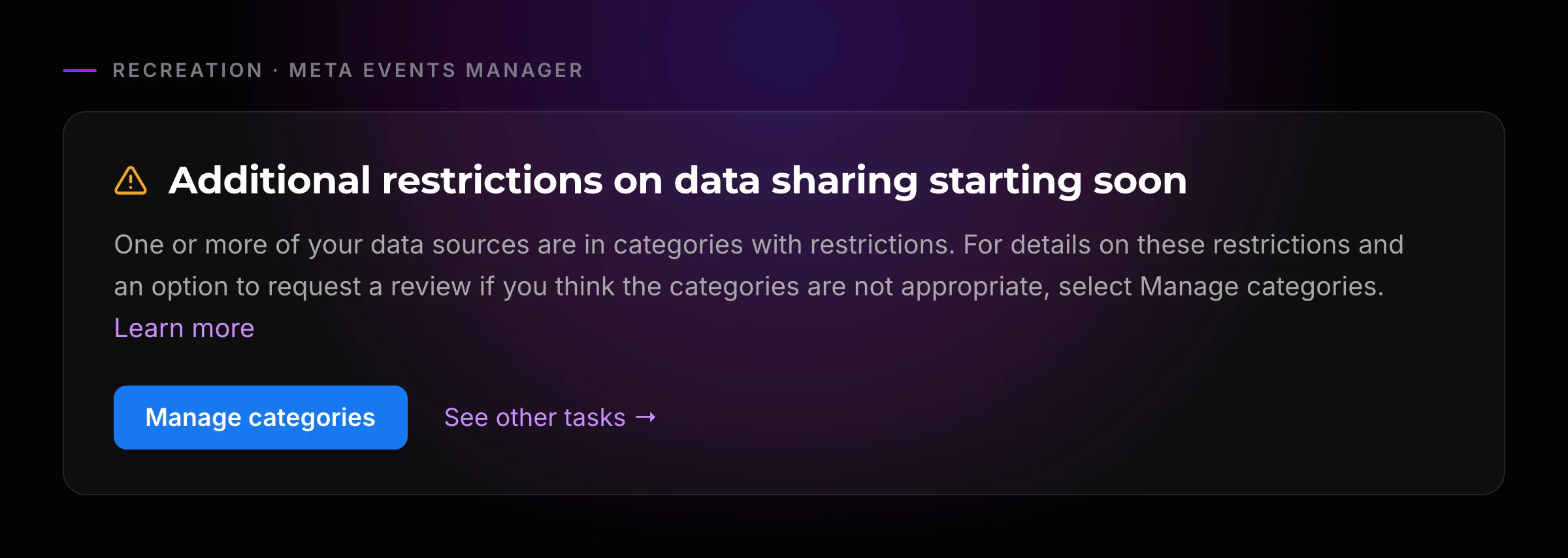
Anyone with Events Manager access can find this, admin or not. In practice most campaign managers have no reason to open Events Manager on a normal week, so this is not a reliable early warning either.
You have 30 days. If you want to avoid losing any data at all, that is your entire window.
Can you appeal?
You can. In Events Manager, the Manage categories button lets you ask Meta to review how your site was categorized.
It is only worth doing if Meta actually got it wrong. If your site really does offer healthcare services, the review will confirm exactly that and the restriction stays. There is no version of this where a correctly categorized health site talks its way out. Once you know the category is right, the useful move is to stop appealing and start adapting.
What you see 30 days later
When the grace period runs out, Meta sends a second email. Again, admins only:
This one actually tells you why. For a clinic it names the category outright: the data source "provides or facilitates access to healthcare or healthcare and wellness providers, products or services."
And the Events Manager banner changes to the past tense — the Manage categories button is gone, because there is nothing left to decide:
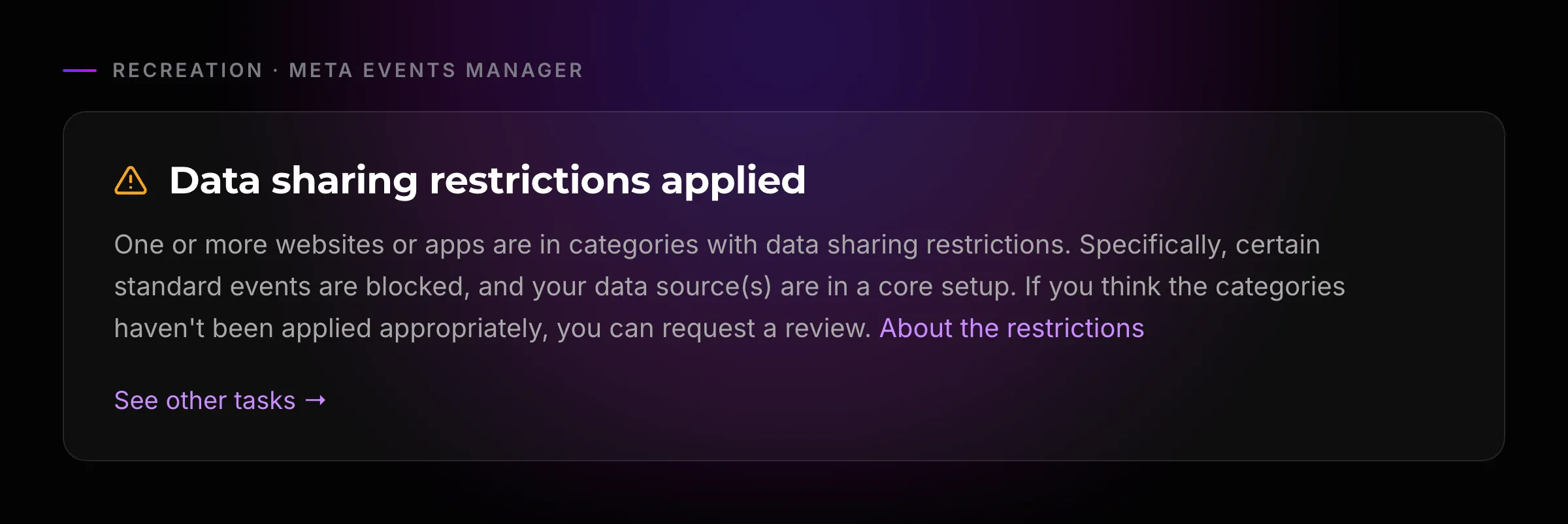
The text is identical whichever level you got, so this screen will not tell you how badly you are hit. To find that out you have to look at what actually stopped arriving — or run the check at the end of this guide.
What does not fix it
Three things people try first, and why each one fails.
A new pixel. The obvious move, and it does nothing. Meta restricted the domain, not the pixel. A brand-new pixel on the same site is a new pixel reporting the same restricted domain, so its events get dropped just like the old one's.
The Conversions API, installed the usual way. Installing CAPI is a good idea for its own sake — Meta gets better data and rewards you for it. But if you install it expecting the restriction to lift, it will not. Server-side GTM, a backend integration, a gateway, the checkbox in Business Manager: they all change how the event travels and none of them change what it says about you. The payload still names the domain Meta classified, so a CAPI event from a restricted domain is dropped exactly like a pixel event from it.
Moving the site to a new domain. This one would technically work, and it is still a bad idea. You would throw away the SEO and the brand equity you spent years building, pay for a migration that is slow and expensive, and have no guarantee Meta does not classify the new domain the same way within a few months. You would win on one side and pay it back with interest on the other.
What actually fixes it
Two things have to be true at the same time. The Facebook pixel has to stop sending, because by design it always reports the URL of the page it fired on and there is no setting that changes that. And every event has to reach Meta through the Conversions API under a source URL Meta has not classified. Either half on its own still leaves the restricted domain exposed.
That is what Metamorph does. It takes the place of the Facebook pixel on your site: it captures every event you already track — standard and custom — keeps the cookies Meta needs for attribution, and relays everything to Meta through the Conversions API from a source that is not your restricted domain. Every subscriber gets their own, so you can never be caught by someone else's block. Exactly how that source is built is the part we do not publish, for reasons that should be obvious.
What you get back is the thing you lost: Lead, Purchase, CompleteRegistration and your custom events land in Events Manager again, which means campaigns can optimize for them again, and you can build audiences from them again.
One trade-off is worth knowing before you start. Page paths are not sent, so you can no longer build a Meta audience out of "everyone who visited /sedation-tooth-extraction". That is the price, and it is the whole reason the events get through. In exchange you get your standard and custom events back, and you can build audiences on those instead.
You do not install anything. Start the 7-day free trial and our team contacts you within one business day and does the whole setup — connecting your pixel, putting Metamorph in place on your site — included in the subscription. It is priced per pixel, per month: 100 EUR plus VAT in the eurozone, billed in your own currency elsewhere. Cancel whenever you want.
If you are an agency and would rather do the setup yourself for your clients, that is supported too, and it earns you commission — see the agency program.
How to check where you stand
The fastest way to find out whether Meta has restricted a domain is to run it through our free audit. Type in the URL and it tells you within about a minute whether that site is under a data sharing restriction, and roughly how severe it is:
- Not restricted
- Level 1 restriction
- Level 2 or Level 3 restriction — this is where Metamorph is worth having
It works on any domain, not just your own. If you are a PPC agency and a healthcare prospect walks in, running the free Meta restriction audit before you write the proposal tells you what you are actually signing up for. Finding out afterward, when the Leads never arrive, is a much worse conversation.
Run your free audit
Takes about a minute — results on this page.
FAQ
What are Meta data sharing restrictions?
A data sharing restriction is a limit Meta puts on a website, not on an ad account or an ad. Meta reads the hostname, the page paths and the URL parameters your pixel reports, decides your site belongs to a sensitive category such as healthcare, and then stops accepting some or all of the events coming from that domain. Your Facebook pixel keeps firing. The events just stop showing up in Events Manager, so campaigns optimizing for them have nothing to learn from.
Which industries does Meta restrict?
Health and medical is the big one, and dental and aesthetic clinics get hit hard. Supplements, wellness, pharma, mental health, gambling, adult, firearms, tobacco, alcohol, faith and religion, and parts of finance, lending and crypto are all on the list. Customer portals and sites behind a registration wall get flagged too. In our August 2026 audit, 41.2% of the health and wellness sites we found running a Meta pixel were restricted.
Can a restricted domain be un-restricted?
You can ask Meta to review the category in Events Manager, under Manage categories. That is worth doing only if Meta got the category wrong. If your site really does sell healthcare, the review will confirm it and the restriction stays. There is no appeal that makes a correctly categorized health site un-restricted.
Is this the same as an ad account ban?
No. Your ad account is fine, your ads keep running, and you keep spending money. What breaks is measurement: the conversions those ads produce never reach Meta, so the delivery system cannot optimize for them. That is why it often goes unnoticed for weeks — nothing is disabled, results just quietly get worse.