
Why the Conversions API Alone Won't Fix a Blocked Domain
8 min readUpdated 31 July 2026
The short answer
There is a common belief that installing the Meta Conversions API (CAPI) makes the measurement problems in healthcare and other sensitive verticals go away in one move. It doesn't. The problem is not how the data is delivered — it is what the data says about you. Moving the same information from a client-side call to a server-side one does not get you around the restriction, because both of them hand Meta the same domain name. There is a way out, but it is not the one most people try first.
What a data sharing restriction actually does
A data sharing restriction means your Facebook pixel can keep firing events all day and they will not show up in Events Manager. If your campaigns are optimizing for a Lead event on your website and your site falls under a data sharing restriction, the Meta pixel will still run its Lead events — but none of them reach Events Manager, so your campaigns starve. They never get a Lead to learn from.
The result is that the ad system starts flying blind. It has no idea what the people it sent to your site actually did there, because your conversion tracking is no longer working. So the campaigns spend more and more while delivering worse and worse results. A measurement failure like this can easily set your return on ad spend back by several thousand euros.
Which categories Meta restricts — and how it decides
Meta applies the strongest data sharing restrictions to websites in the Health & Medical, Supplements, Pharma, Gambling, Alcohol, Tobacco, Adult and Faith categories. Lighter restrictions exist as well — the Financial category is a typical example.
Which category a website lands in is inferred by Meta from the hostname and the page paths. If Events Manager receives data from bestever.dentist/sedation-tooth-extraction, Meta does not have to work hard: it is unambiguous that this site belongs in Health & Medical, and it gets the strongest restrictions that category carries.
If you believe Meta has categorized your site incorrectly, you can request a manual review in Events Manager. In a great many cases, though, Meta categorizes it exactly right — and then you have to accept that advertising on Facebook is no longer going to be as easy as it used to be.
Meta rolled the restrictions out worldwide, and applies the strongest version of them in the European Union. In the EU these verticals can face a total restriction, meaning Meta will not let you run any standard or custom event beyond PageView. In the US the company is one notch more permissive: standard events may still be allowed.
The restriction has three levels:
- Level 1 — Meta stops accepting certain URL parameters, so you can no longer build audiences on them.
- Level 2 — Meta blocks some events outright. Sending a Lead or Purchase event, for example, is no longer possible. This is the level you have to deal with if you want to run conversion-objective campaigns at all.
- Level 3 — Maximum restriction. You are down to PageView events, and very often only a heavily limited number of those. It can be days before any data enters the system. At this level it is effectively impossible to run anything other than a Clicks objective — even Landing Page Views will not work properly.
Level 1 is not really worth acting on, though it is worth checking whether your URL-based custom audiences are still filling up. If they are not, a data sharing restriction should be your first suspect. Levels 2 and 3, on the other hand, demand action: you are advertising blind, and Meta is essentially burning money instead of bringing you good traffic. The good news is that the fix for Level 2 and Level 3 is the same one, so it does not matter which level Facebook has blessed you with.
What the site owner gets: a 30-day warning
Anyone with admin access to a Meta Business Manager will receive an email from Meta saying the website has been categorized and that data sharing restrictions will take effect within 30 days. If you want to avoid losing a single minute of data, that is your window: the problem has to be solved inside it, or your conversion tracking stops.
What the advertiser sees
In Events Manager, advertisers get one not particularly informative message:
Data sharing restrictions applied
One or more websites or apps are in categories with data sharing restrictions. Specifically, certain standard events are blocked, and your data source(s) are in a core setup. If you think the categories haven't been applied appropriately, you can request a review.
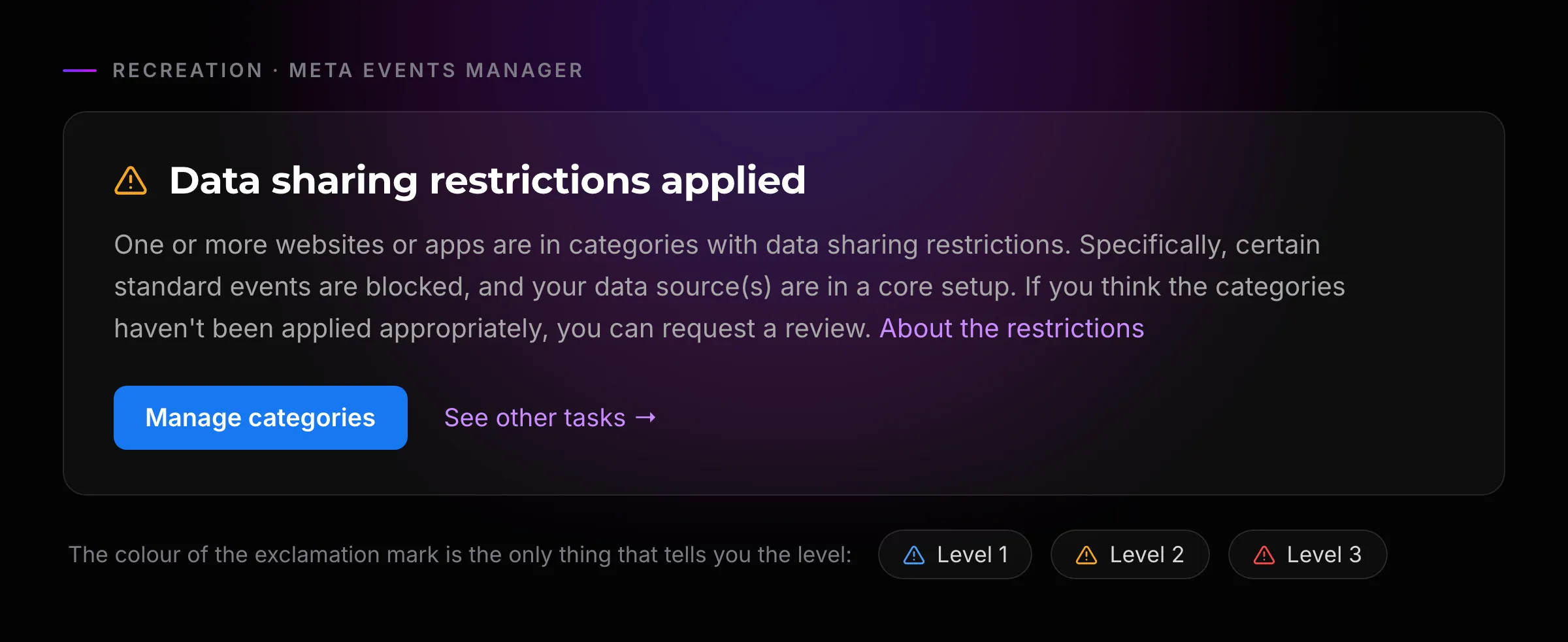
Whatever category of restriction Meta has landed on you with, the message is the same. Level 1, 2 or 3 — the identical text is waiting in Events Manager. Oddly enough, the way to tell which level you are on is the colour of the exclamation mark in front of the "Data sharing" line: blue means Level 1, yellow means Level 2, and red means Level 3.
The restriction is visible from the browser console as well. There are two messages more technical readers may recognise from it. The first one arrives on the page load itself — the pixel reports that it is simply not available:
[Meta pixel] 12345678912345 is unavailable. Go to Events Manager to learn more.
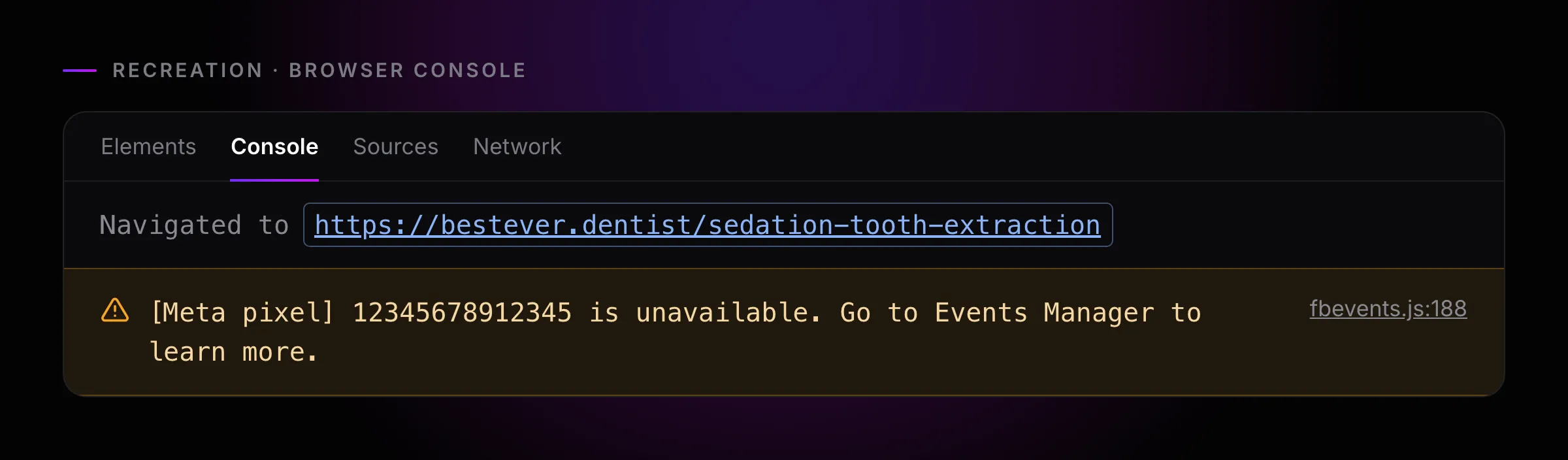
In other cases, the page loads fine and the pixel only refuses the individual event when it tries to fire:
[Meta Pixel] - You are attempting to send a restricted event. The event was suppressed. Go to Events Manager to learn more.
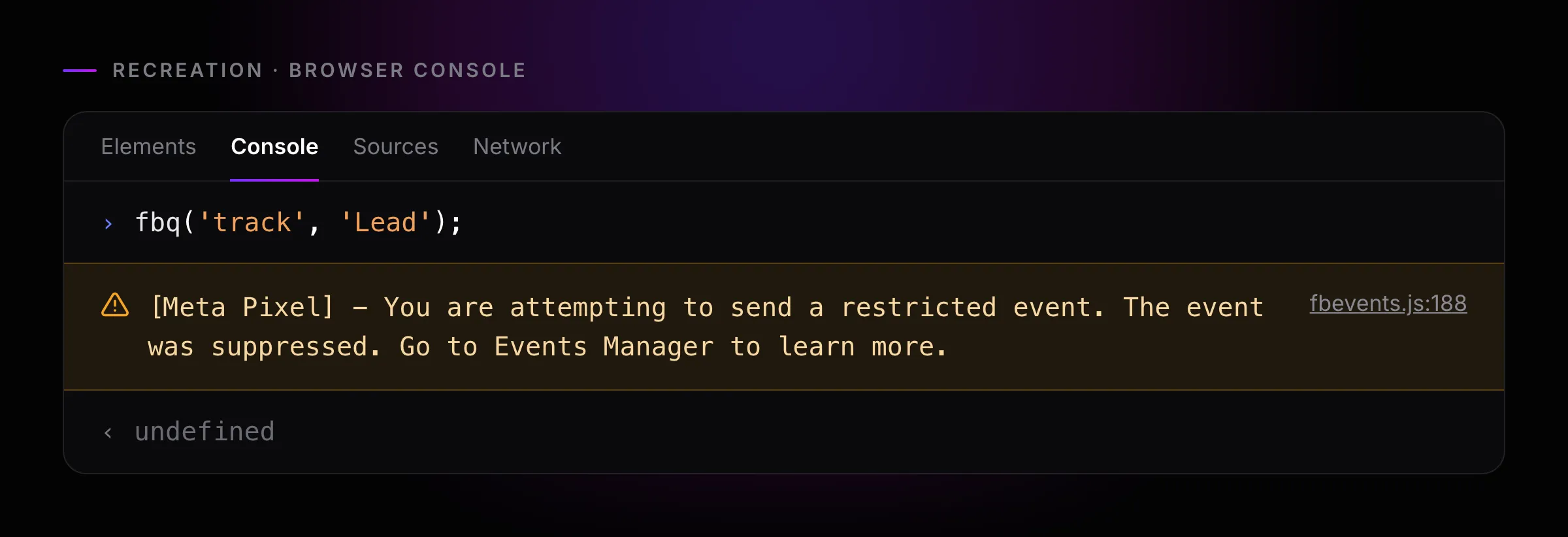
Does this mean you can never optimize a Meta campaign for conversions again? No — it just means you have to get a little more creative.
What Meta actually blocks — the domain, not the transport
Installing CAPI is a good move in itself: Facebook gets more data, and it repays better data with better results. But if you are installing it to make the restriction on your pixel go away, you are going to be disappointed — it will not go away. What Meta classified into a restricted category is the domain name itself.
What actually works
Now that we know the problem is the domain name, we can start thinking about how to solve it. The answer is obviously not to register a new domain and move the whole site there under some illogical set of paths. It would probably solve the problem in Facebook's eyes, but it would put you at an enormous SEO disadvantage against your competitors — what you won on one side you would pay back with interest on the other. On top of that, a domain migration is expensive, slow, and its success is far from guaranteed.
The Facebook pixel cannot get you out of this either, because it will always pass the page URL it fired on. There is no way to prevent that. The solution ends up being the Conversions API — but not installed the way you would install it on any other site.
CAPI can be set up from your backend, through server-side GTM, via a gateway, and lately even by ticking a checkbox in Meta Business Manager. None of those directions helps with this particular problem. The problem is still that your domain is the thing under restriction in Meta's eyes. If you take the data that runs client-side and pass it through CAPI as well, Meta will still see which domain it came from — so the CAPI event gets blocked exactly like the pixel event did.
The real solution has two halves. First, send nothing through the pixel at all, because — as we saw — by its very design it would report the page path. Everything goes through CAPI. Second, change the URL the data appears to arrive from. That is precisely what Metamorph does: instead of bestever.dentist/sedation-tooth-extraction, it sends the data from a domain Meta has never seen before, which is exactly why Meta does not block it. Importantly, every Metamorph subscriber sends from their own unique domain name, so being caught by someone else's block is off the table.
Several measures run in the background to keep that generated domain from being restricted the way the "real" one was, but the most important is that we do not pass page paths. One consequence is worth knowing up front: you can no longer build a custom audience inside Meta from visitors to the /sedation-tooth-extraction page, because Meta no longer sees that anyone was on that page. In exchange, changing the domain name makes it possible again to pass Meta's standard and custom events — and therefore to define custom audiences from those events.
Setting Metamorph up is straightforward on top of that. If your Meta tags were firing from Google Tag Manager, all you need is to place the Metamorph Base Code and Meta starts measuring again. You do not have to rebuild your GTM container: with our GTM tag template you only need to add a single GTM tag, though a native implementation is of course possible too. And if you are willing to do a bigger GTM (or native code) rework, you can reach a higher Event Match Quality with Metamorph than you had with the Facebook pixel, because here the advanced matching parameters can be passed per event, whereas the pixel could only pass them on page load. But that is a story for another guide.
How to check where you actually stand
This guide has talked about the browser console, Events Manager, the (C)API and the pixel — and let's be honest, those are fairly technical terms and buzzwords. The simplest way to find out whether your domain is affected by a data sharing restriction is our free Meta restriction audit tool. You give it the URL of the site in question, and within a minute it tells you whether that domain is caught by data sharing restrictions or not. It is useful if you want to check your own business, and it is just as useful for PPC agencies running an audit on a prospective client.
Run your free audit
Takes about a minute — results on this page.
FAQ
Does the Conversions API bypass Meta's data sharing restrictions?
No. The Conversions API changes how an event reaches Meta — from your server instead of the browser — but the payload still names the same domain Meta classified. The restriction is attached to the domain, so a CAPI event from a restricted domain is dropped exactly like a pixel event from it.
Why do my Conversions API events show up but still not optimize?
Arriving and being usable are two different things. Depending on the restriction level, Meta may accept an event into Events Manager but refuse to let you optimize for it, build an audience from it, or use it in a custom conversion. That is the restriction working as designed, not a setup error.
What actually makes a restricted domain work again?
Two things together: stop sending anything through the Facebook pixel, because it always reports the page URL it fired on, and send every event through the Conversions API under a source URL Meta has not classified — with the page path removed. Either one alone leaves the restricted domain exposed.